Best 60Hz Monitors of 2026
We independently evaluate all recommended products and services. If you click on links we provide, we may receive compensation.
60Hz monitors are a popular choice for those who need a basic display for everyday tasks such as browsing the web, checking emails, or working on documents. These monitors offer a refresh rate of 60 times per second, which is sufficient for most general use cases. They are also affordable and widely available, making them a convenient option for those on a budget. While they may not be suitable for high-end gaming or video editing, 60Hz monitors provide a reliable and functional display for everyday use.
At a Glance: Our Top Picks
Top 3 Products

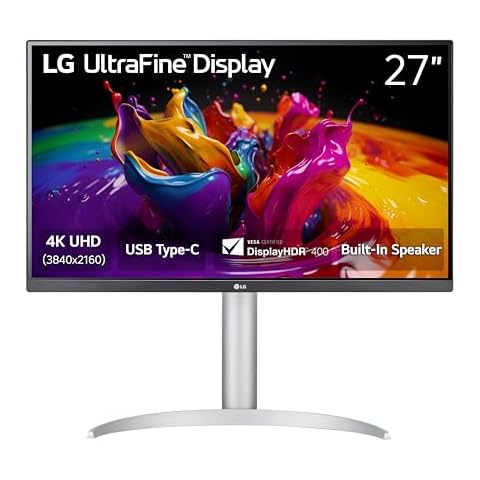
LG 27UP850K-W 27" 4K UHD Monitor
• Best Built-in Speakers Monitor
LG 27UP850K-W 27-inch Ultrafine 4K UHD (3840 x 2160) IPS Computer Monitor, 60Hz, 5ms, DisplayHDR 400, Built-in Speaker, HDMI, DisplayPort, USB Type-C 90W PD, Tilt/Height/Pivot Adjustable Stand, White
The LG 27UP850K-W 27" 4K UHD Monitor from LG offers a sharp and vibrant 27-inch screen with a 4K UHD resolution, perfect for enjoying crisp images and rich colors whether you’re watching movies or working on detailed projects. Its HDR support enhances brightness and color depth, making visuals more lifelike and immersive. You’ll appreciate the wider color range, covering up to 95% of the DCI-P3 spectrum, which means more accurate and vivid colors for your content. Plus, the monitor comes with multiple ports including USB Type-C with power delivery, HDMI, and DisplayPort, so you can connect various devices easily without needing extra adapters.
What We Like
- ✓ 4K UHD resolution
- ✓ HDR 400 support
- ✓ 95% DCI-P3 color gamut
- ✓ Multiple connectivity options

SANSUI 24" IPS Monitor (ES-24X5AL)
• Best 24 Inch Monitor
SANSUI Computer Monitor 24 inch Eye Care 1080P Display HDMI,VGA Ports with 178° Viewing Angle/Frame-Less/Tilt/VESA Compatible for Office and Home
The SANSUI 24" IPS Monitor (ES-24X5AL) from SANSUI offers a vibrant 1080P display perfect for home, gaming, and office use. With a refresh rate of up to 75Hz, you can enjoy smooth visuals and reduce motion blur during fast-paced action. The monitor features HDMI and VGA ports, making it easy to connect to various devices, although it lacks built-in speakers or a headphone jack. Its ergonomic design allows for a tilt range of -5° to 22° and a wide viewing angle of 178°, ensuring comfortable viewing from different positions. This combination of features makes it a versatile choice for any workspace or leisure setup.
What We Like
- ✓ High-resolution display
- ✓ Wide viewing angles
- ✓ Ergonomic tilt design
- ✓ Multiple connectivity options

KEFEYA 14" FHD Portable Laptop Monitor Extender
• Best USB C Monitor
Capacity: 24 Inch
KEFEYA Laptop Screen Extender, 14" FHD 1080P IPS Laptop Monitor Extender Dual Screen, Portable Monitor for Laptops 13-17" with USB-C/HDMI Port, Plug n Play for Windows/Mac/Android/Switch/PS5
The KEFEYA 14" FHD Portable Laptop Monitor Extender from KEFEYA helps you boost your productivity by allowing you to work on multiple windows simultaneously. This means you can easily manage work tasks, video calls, or entertainment without constantly switching screens. Its 14-inch Full HD IPS display delivers clear, vibrant images with adjustable brightness and contrast, making it comfortable for your eyes during long use. The device is also very user-friendly with plug-and-play setup, so no extra software is needed—just connect via USB-C or HDMI. Plus, it offers flexible viewing with multiple display modes and can rotate 180°, letting you customize how you see your content for better collaboration and convenience.
What We Like
- ✓ Boosts productivity
- ✓ High-quality Full HD display.
- ✓ Easy plug-and-play setup
- ✓ Flexible display modes
- ✓ 180° screen rotation